

Decision Maker

Get the Full Picture, Take Control
Decision Maker lets you see exactly what your employees
are adding to their carts live. Whether it’s popular seats or
tricky buys, you’re in charge. Approve, decline, or steer the
plan anytime. No guessing, just smart moves.
What does it do?
- Live Cart Monitoring
See every section, row, and seat your pullers are adding in real time. - Approve or Reject Instantly
Love the section? Approve it. See something off? Reject with a click before money moves. - Seat Value Calculator
Instantly view estimated value ranges for each carted ticket to guide your decisions with confidence. - Agent Activity Monitor
Get a clear breakdown of who’s pulling what, when, and how often spot top performers, optimize shifts, and fine-tune your team’s pulling strategy.
Made for Owners, Leads, and Strategists
Whether you’re:
- Leading a team of buyers
- Managing profits on big drops
- Avoiding risky purchases
- Or just want full control over every buy
Decision Maker gives you oversight and authority in one clean dashboard.
HOW TO ACTIVATE DECISION MAKER
in most cases, our onboarding specialist will have this feature turned on for you by default.
If it’s not enabled yet, you can activate it yourself in just a few steps:
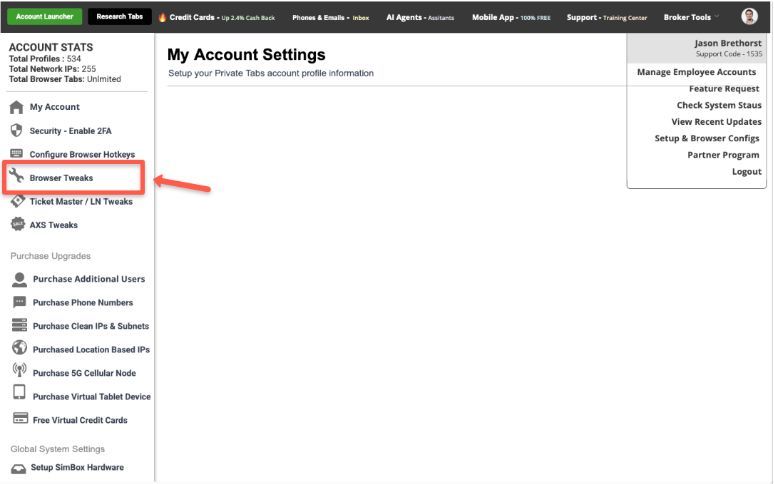
- Open Settings in your Private Tabs app.
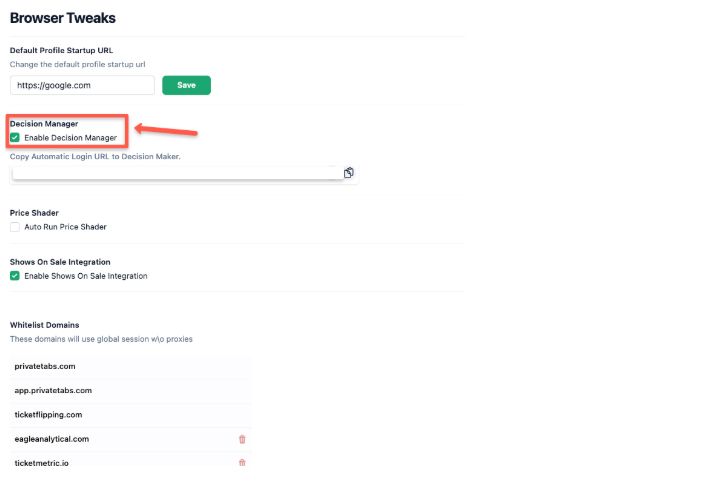
- Go to Browser Tweaks.
- Toggle Decision Maker to On.
Once enabled, you can access the Decision Maker anytime by opening the Broker Tools menu in your toolbar.
Need help with setup or strategy?
Call us at
414-326-4100
Book a support session
here
Or email:
support@privatetabs.com