

Release History

Stay Updated with Every Private Tabs Upgrade
Private Tabs is built to help you win so we’re constantly adding new tools, speeding things up, and fixing anything that slows you down. If you’re not up to date, you might be missing out on the very things that could help you get ahead.
Where to See the Latest Updates
We release updates every few days — and track them all for you.
View the full list of updates here →
(We recommend checking weekly, especially before big onsales.)
What Kinds of Updates?
Here’s what you’ll typically find in our changelog:
- Bug fixes for mobile, browser, and extension
- New features
- Performance boosts and backend improvements
- Security or session reliability upgrades
- Small improvements you may not notice but will definitely feel
Not Sure Which Version You’re On?
It’s easy to check.
On Desktop:
- Open the Private Tabs app
- Click the profile icon
- Click “Check System Status”
On Mobile:
- Open Private Tabs Mobile
- Tap the headset icon
- At the top— version number will be there
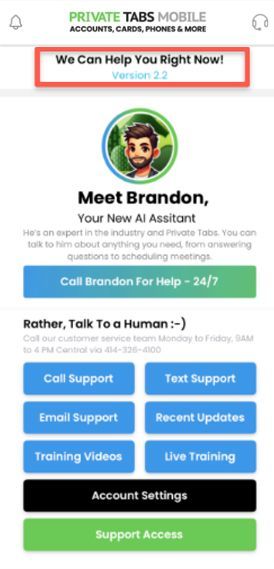
More improvements roll out regularly. Check back often to see what’s new!
GOT A SUGGESTION?
We love hearing from our community!
If there’s something you’d love to see added or improved, send your idea our way
here.
Need Help or Want to Request a Feature?
Call us at
414-326-4100
Book a support session
here
Or email:
support@privatetabs.com